

Q & A :: RBSC FAMILY WONDERLAND
Q: How to buy a ticket?
วิธีการซื้อบัตร
A: Please scan the QR code to order online. Online purchases are available from now until Saturday, January 10, 2026, at 9:00 PM.
กรุณาสแกนคิวอาร์โค้ดเพื่อสั่งซื้อออนไลน์ ได้ตั้งแต่วันนี้ จนถึงวันเสาร์ที่ 10 มกราคม 2569 เวลา 21.00 น.

Q: What should I do if I haven’t received or need to verify the QR code?
ไม่ได้รับคิวอาร์โค้ด หรือ ต้องการตรวจสอบคิวอาร์โค้ด ต้องทำอย่างไร
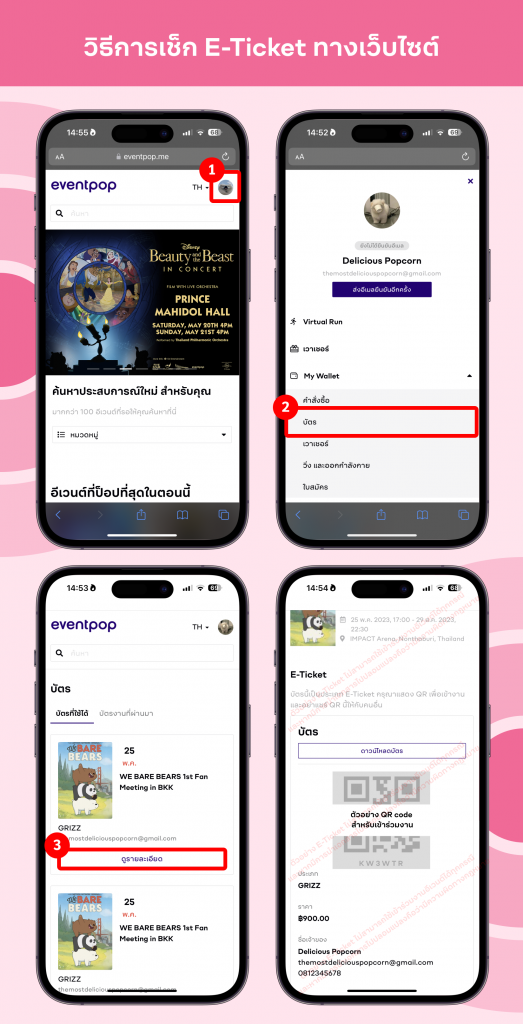
A: How to Check and Download Your E-Ticket
Log In: Go to the Eventpop website and log in to your account. Then, click on your profile icon in the top right corner.
Select Tickets: Choose the “My Tickets” menu. Find the event you want and click the “View Details” button.
Download PDF: Your E-ticket will be displayed on the screen. To save or print it, click the “Download Ticket” button. The system will generate your E-ticket as a PDF file.
วิธีการตรวจสอบและดาวน์โหลด E-ticket ผ่านเว็บไซต์
1. เข้าไปที่เว็บ Eventpop และเข้าสู่ระบบด้วยบัญชีของคุณ จากนั้นคลิกที่รูปไอคอนโปรไฟล์มุมขวาบน
2. เลือกหัวข้อ “บัตร” จากนั้นกดปุ่ม “ดูรายละเอียด” ของงานที่ต้องการ
3. หน้าจอจะแสดง E-Ticket สำหรับเข้าร่วมงานของคุณ หากต้องการดาวน์โหลดและพิมพ์บัตร คุณสามารถกดปุ่ม “ดาวน์โหลดบัตร” ระบบจะแสดง E-Ticket ในรูปแบบไฟล์ PDF
Q: Can buy tickets at the event?
บัตรมีจำหน่ายที่หน้างานหรือไม่ และจุดใดบ้าง
A: Tickets are available at 2 locations from 1 p.m. – 9 p.m.:
- Sports Pavilion (Front)
- Driving Range
Member cards are accepted.
บัตรมีจำหน่ายที่หน้างาน 2 จุด ตั้งแต่เวลา 13.00 น. – 21.00 น. ดังนี้
- หน้าอาคารสปอร์ต พาวิเลี่ยน
- ลานซ้อมกอล์ฟ
โดยเพิ่มทางเลือก ชำระผ่านบัตรสมาชิกได้
Q: What should members 65 and over do if they are unable to make a purchase online in advance?
สมาชิกที่มีอายุ 65 ปีขึ้นไป หากไม่สะดวกซื้อผ่านออนไลน์ล่วงหน้า ต้องทำอย่างไร
A: There is a dedicated counter for members aged 65 and above to verify their eligibility and receive a wristband for immediate entry.
จุดจำหน่ายบัตรหน้างาน มีช่องสำหรับสมาชิกที่มีอายุ 65 ปีขึ้นไป เพื่อตรวจสอบสิทธิ์และรับสายรัดข้อมือเพื่อเข้างานได้ทันที
Q: Will there be seating available for those who did not purchase a table?
หากไม่ได้ซื้อแบบโต๊ะจะมีที่นั่งภายในงานหรือไม่
A: For members who did not purchase a table, seatings are available at various points throughout the event on a first come first served.
หากสมาชิกไม่ได้ซื้อแบบโต๊ะ จะมีที่นั่งแบบ first come first served ให้เลือกตามจุดต่างๆ ภายในงาน
Q: Where are the parking areas located?
มีบริการจุดจอดรถยนต์ที่ใดบ้าง
A: Parking Locations for Members
- Car Park
- Grandstand Parking
- Gate 9 Parking Lot
- Sand Track
- RBSC Polo Club
- Faculty of Arts Parking Building, Chulalongkorn University * These parking areas are reserved exclusively for members displaying a valid Club car sticker. Parking is free of charge.
สมาชิกสามารถจอดรถยนต์ได้ที่
- อาคารจอดรถ
- ที่จอดรถแกรนด์สแตน
- ลานจอดรถประตู 9
- บริเวณสนามทราย
- สมาคมฯ โปโลคลับ
- อาคารจอดรถคณะอักษรศาสตร์ จุฬาลงกรณ์มหาวิทยาลัย *เฉพาะสมาชิกที่มีบัตรติดหน้ารถยนต์ของทางสมาคมฯ เท่านั้น ไม่มีค่าใช้จ่าย
Q: Where can guests of members park?
แขกของสมาชิกจอดรถยนต์ได้ที่ใดบ้าง
A: Guests of members may park their vehicles at the following locations:
- RBSC Polo Club
- Faculty of Arts Parking Building, Chulalongkorn University (Parking fee: 15 THB per hour)
Please note: Shuttle Service
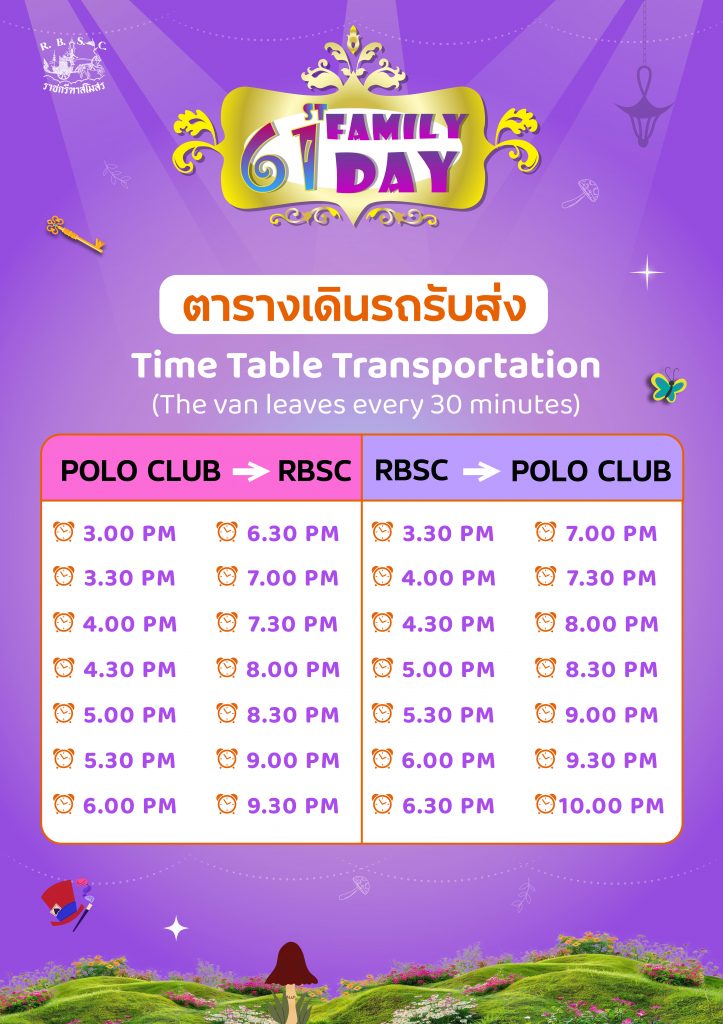
- For parking at the RBSC Polo Club, a shuttle van service is available to transport you to the RBSC.
- Guest vehicles are not permitted to park inside the Club premises.
แขกของสมาชิกสามารถจอดรถยนต์ได้ที่
- สมาคมฯ โปโลคลับ
- อาคารจอดรถคณะอักษรศาสตร์ จุฬาลงกรณ์มหาวิทยาลัย อัตราค่าจอดรถชั่วโมงละ 15 บาท
บริการรถรับ-ส่ง
- สำหรับการจอดรถที่ RBSC Polo Club มีบริการรถรับส่งเพื่อพาไปยัง RBSC
- รถยนต์ของแขกสมาชิกไม่สามารถจอดภายในสมาคมฯ ได้
Q: How can I get to the event if I don’t bring a private car?
หากไม่ได้นำรถยนต์ส่วนตัวมา เดินทางมาร่วมงานได้อย่างไรบ้าง
A: Public Transportation & Drop-off Points
- By BTS Skytrain: Take the BTS to Ratchadamri Station and enter through Gate 9.
- By Taxi or Grab: Please get dropped off at Gate 3.
การเดินทางโดยขนส่งสาธารณะและจุดรับส่ง
- BTS ลงสถานีราชดำริ เข้าทางประตู 9
- รถแท็กซี่หรือ Grab Car ลงประตู 3
For more information, please contact Line: @rbsc
สอบถามข้อมูลเพิ่มเติม กรุณาติดต่อ Line @rbsc